Themes and branding
Write an App’s own theme by purpose with defineTheme, and let each tenant put its logo, name and accent on it.
export const meridian = defineTheme({ id: 'meridian', label: 'Meridian', colors: { light: { ground: '#f6f5f1', surface: '#ffffff',// … type: { font: { heading: '"Iowan Old Style", "Palatino Linotype", Palatino, Georgia, serif' } }, shape: { radius: { control: '6px', field: '6px' } },});Lintel’s theme (examples/apps/lintel/theme.ts) is the smallest one: Lumen with recipes: { header: 'hero' }. defineTheme checks every color and shape.
What you’ll see
Section titled “What you’ll see”- Every page in the theme’s colors, corners and faces, light and dark, with the treatments its recipes pick.
- In a tenant App with
branding, each tenant’s logo, name and accent in the bar, the tab, its sign-in page, its public forms and its mail.
When to use it
Section titled “When to use it”- Use a built-in look (Looks) unless the brand needs its own grounds and inks.
- Use
extendsto start from a built-in and say only what differs; leave it out to start from the plain structure and name the four colors the rest derive from. - Use
brandingwhen one deployment serves several organizations that each want their own logo and accent. - Use
type.facesto ship the brand’s own font: WOFF2 files in the App’s directory, cut to Latin as served, at most 150 KB together, the heading’s face preloaded (fonts).
Options
Section titled “Options”| Key | What it does | Default | Status |
|---|---|---|---|
extends |
The built-in look to start from, lumen, mono or sage, or a theme that extends one (publish a look) |
none: the plain structure, and ground, surface, ink and accent named |
Stable |
colors.light, .dark |
Colors by purpose: ground, surface, ink, accent (a fill; onAccent is the words on it and accentInk the accent as text, each derived to read when omitted), line, status, nav, chart, rules, shadow; nav dresses the menu under every bar recipe, shadow is the ink every lift is mixed from; a theme that names an accent and no chart draws its first chart series and its metric sparklines in that accent |
the base’s | Stable |
shape.elevation |
A preset (flat, hairline, soft, raised), or { card, float }, each none, hairline, low, mid or high, over the base’s drawing |
the base’s | Stable |
scheme |
dark: worn dark until the reader picks a mode, still with a light mode. dark-only: no light colors, colors names dark alone, and a reader cannot turn it light |
follows the reader and their machine | Stable |
palettes |
Named variations a reader may pick | none | Stable |
shape, type, density |
Corners (radius: { control, field, pill, panel }: a control 0px–16px or 'round', a field and a pill 0px–12px, a pill round when omitted, a panel 0px–20px), widths (border: { rule, control, panel, focus }), font stacks, spacing |
the base’s | Stable |
motion |
The pace things enter at: house, brisk (a quarter quicker) or still (nothing enters, as reduced motion draws it); reduced motion is still under every pace |
house |
Stable |
rhythm |
How far apart things stand: house, tight (the layout steps, --space-5 to --space-8, and --section-seam a quarter closer) or airy (a quarter wider); a control’s own padding never moves |
house |
Stable |
type.base |
The size an App’s text is drawn at, 13px to 16px; every size grows with it |
13px |
Stable |
type.roles |
How each kind of text is drawn: display, title, heading, section, body, label, data, figure, nav, each a face, size, leading, tracking, weight, case and features where it takes one (Type) |
the base’s | Stable |
type.faces |
Font files the theme ships from the App’s directory (fonts) | none | Stable |
colors.*.band, recipes.table: 'banded' |
Every other row of a table on the band color, each ink checked on it; lists and grids only, not the calendar. A status or tag with an opaque parts ground keeps it on the band and check warns (theme-band) |
raised |
Stable |
surface |
A pattern behind the page (ground) and the menu (nav): paper, grain, grid, dots, lines or scanlines, strength 1 to 3, in the theme’s line color |
none | Stable |
parts |
A published part’s own ground, ink, edge (color roles by path, never hex), radius, lift, face, weight and case; never its size or visibility |
none | Stable |
type.icons |
The icons’ weight: regular, light, bold or fill |
regular |
Stable |
stylesheet |
A .css file beside the theme, at most 8 KB, that dresses published parts only: [data-part="stat"] rules, role colors, pictures beside it, edges, corners, lifts and faces, never a size or a place; refused by line otherwise. No glow: a shadow is one of the look’s lifts in the theme’s shadow, which C2 refuses lighter than the ground, and text-shadow and filter are refused |
none | Stable |
contract, from |
A published look says the contract it was written to (1) and from: import.meta.url, so its faces and stylesheet are read from its package |
none | Stable |
recipes |
Each part’s treatment from a closed menu: nav, bar, tabs, stat, table, buttons and more, each value pictured in Theme recipes |
the base’s | Stable |
shell.placement |
Where the menu goes, 'side' or 'top', when this is the App’s theme; ui.shell.placement wins |
the App’s | Stable |
ui.theme.for |
A theme per audience: public for every page a signed-out visitor sees, worn whatever a reader picked, and roles: { rider: 'cadence' }, the first entry the account holds, over a tenant’s saved theme; a reader’s own pick still wins in the shell |
none | Stable |
branding.allow |
What a tenant may change: logo, name, accent, palette, radius, density, theme |
required | Stable |
branding.editors |
The tenant roles whose members may save it | required | Stable |
branding.themes |
One to six themes a tenant picks from (theme needs two) |
the App’s own look | Stable |
brandingForm() |
A dashboard section: the form beside a live preview | none | Stable |
branding: { allow: ['logo', 'name', 'accent'], editors: ['admin'] },views: { settings: { kind: 'dashboard', sections: [brandingForm('Branding')] } },A tenant App with branding needs its store, once: provisionStores(<the database>, { only: ['branding'] }) from tablewalk/maintenance. An App’s own message may say {brand.name}, {brand.logo} and {brand.accent}; each is filled for the tenant it is sent in.
A tenant that may change logo may also add a second picture for a dark bar and for dark mode; the bar draws it there as it does an App’s own dark, and the first logo stands where there is none. It is never a key of its own in allow.
A look of your own
Section titled “A look of your own”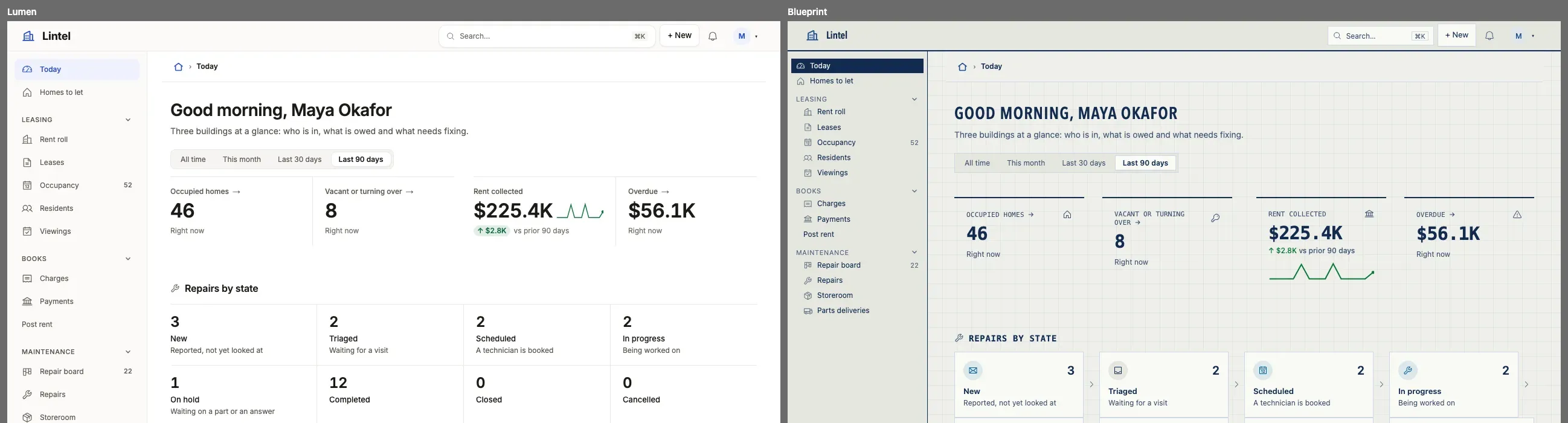
Blueprint is Lintel’s second theme, examples/apps/lintel/blueprint.ts, written from nothing in 61 lines around one idea: the office’s drawing set, blue ink on gridded vellum by day and a blueprint by night. The App, its data and its addresses do not change. Here is the file in order, trimmed.
Colors, light then dark. Name the grounds, the ink and the accent; every color left out is derived. The dark mode is written on its own, not inverted: white lines on cyanotype blue.
colors: { light: { ground: '#eff0ea', surface: '#fafaf6', raised: '#e5e7df', ink: '#132a4f', line: '#ced7e4', lineControl: '#66789a', accent: '#1d4a91', link: '#1d4a91', status: { good: '#0b7736', critical: '#b3261e' }, // … nav, chart }, dark: { ground: '#0e2f5e', surface: '#12386d', raised: '#18427c', ink: '#f3f7ff', line: '#46699d', lineControl: '#93add6', accent: '#f3f7ff', link: '#cfe0ff', // … status, nav, chart },},tablewalk check --app measures every pair in both modes. The first draft’s green and grid line failed, each named with a color that passes:
blueprint.colors.light.status.good: status.good on raised (a status word in a hovered row or on a raised panel)is 4.35:1; it needs 4.5:1 (status.good is #117a38). Try status.good: '#0b7736' (4.54:1).Pattern, shape and spacing. The drafting grid behind the page, square corners, hairlines instead of shadows, and a drawing’s wide margins between sections.
surface: { ground: { kind: 'grid' } },shape: { radius: { control: '0px', field: '0px', panel: '0px', pill: '0px' }, elevation: 'hairline' },density: 'compact',rhythm: 'airy',Type roles. A title block’s lettering, from the system’s own fonts: names in condensed capitals, labels and figures in a monospace, as a dimension is written.
type: { font: { heading: '"Avenir Next Condensed", "Arial Narrow", …, sans-serif', code: 'ui-monospace, …, monospace' }, roles: { title: { face: 'heading', size: '28px', case: 'upper', tracking: '0.04em', weight: 600 }, label: { face: 'code', case: 'upper', tracking: '0.02em' }, figure: { face: 'code', weight: 600 }, // … heading, section },},Recipes and a part. Each part’s treatment from the menu, and one part dressed past it: a status lettered in capitals, as a drawing’s notes are.
recipes: { nav: 'inverted', bar: 'ruled', tabs: 'rule', stat: 'ruled', table: 'open', status: 'dot', header: 'hero' },parts: { status: { case: 'upper' } },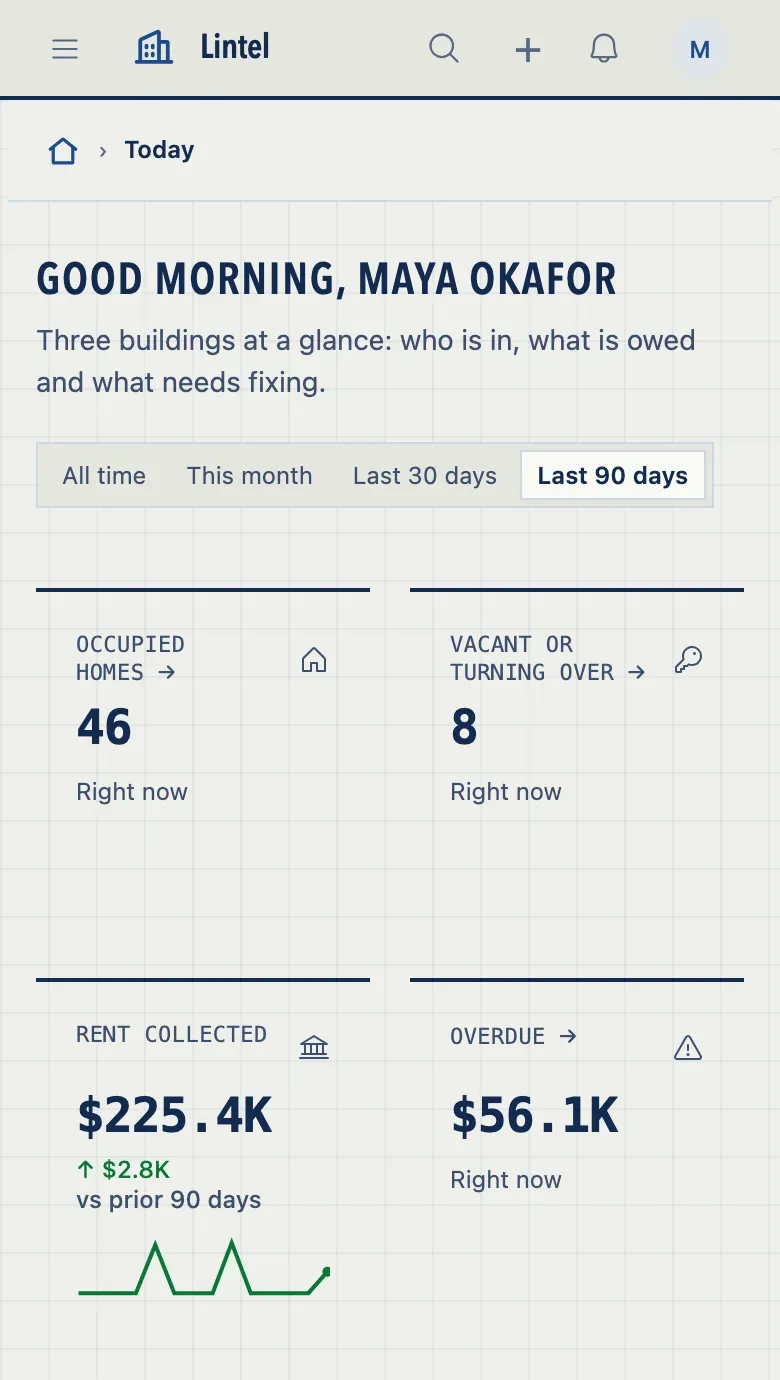
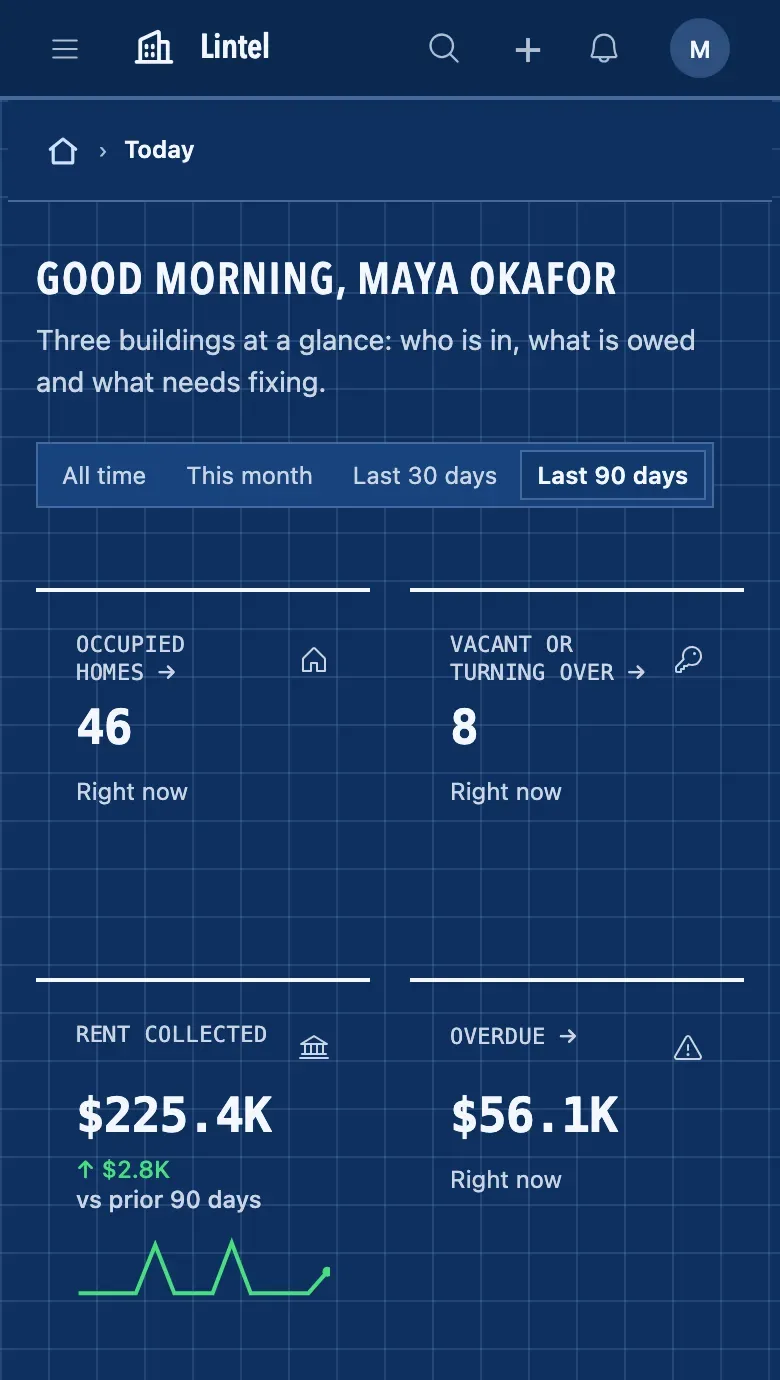
Lintel lists it in ui.customThemes: [lintel, blueprint] and still wears its own. Each reader finds Blueprint under Preferences, Visual theme, beside the built-in looks; the theme ui.theme names is marked “This App’s theme”, and Reset puts a reader back on it. Name ui.theme: { preset: 'blueprint' } and Blueprint is the one marked.
tablewalk grade examples/apps/lintel --theme blueprint then measures the rendered pages, Lintel’s 26 at 1280, 390 and 320 wide and at 390 in dark: a score of 99, no errors, and no finding Blueprint causes.
Three themes to start from
Section titled “Three themes to start from”Each extends no built-in look: it names its grounds, ink and accent, and the rest is derived; tablewalk check passes all three. Copy one into the App’s theme.ts and change what is yours.
A neutral kit: grays, near-black ink, blue links, pill tabs with counts, a status as a dot and its word.
export const canvas = defineTheme({ id: 'canvas', label: 'Canvas', colors: { light: { ground: '#ffffff', surface: '#ffffff', ink: '#0a0a0a', accent: '#171717', link: '#1d4ed8', line: '#d9d9d9', lineControl: '#8e8e8e' }, dark: { ground: '#0a0a0a', surface: '#0a0a0a', ink: '#fafafa', accent: '#fafafa', link: '#93c5fd', line: '#303030', lineControl: '#666666' }, }, shape: { radius: { control: '4px', field: '4px' } },});A printed page: warm paper, a book face over the titles and figures, small capitals over the columns, one red for what is current.
export const ink = defineTheme({ id: 'ink', label: 'Ink', colors: { light: { ground: '#f6f3ec', surface: '#fbf9f4', raised: '#efebe1', ink: '#1c1a17', line: '#ddd6c7', lineControl: '#7a7263', accent: '#1c1a17', link: '#9b2a1d', nav: { ground: '#f6f3ec', line: '#1c1a17', accent: '#9b2a1d' }, }, dark: { ground: '#14120f', surface: '#1b1915', raised: '#23201b', ink: '#f1ece1', line: '#38342c', lineControl: '#8b8475', accent: '#f1ece1', link: '#e8826d', nav: { ground: '#14120f', line: '#f1ece1', accent: '#e8826d' }, }, }, shape: { radius: { control: '2px', field: '2px' } }, type: { font: { heading: '"Iowan Old Style", "Palatino Linotype", Palatino, Georgia, serif' }, roles: { title: { size: '30px' }, label: { case: 'small-caps' }, figure: { face: 'heading', weight: 600, features: ['lnum'] }, }, }, recipes: { nav: 'underline', bar: 'ruled', tabs: 'rule', stat: 'ruled' },});A colored bar: one clear violet under a deep indigo bar, stat cards ruled in the first series, rows tinted on hover. Keystone’s marketplace wears one in navy and amber.
export const iris = defineTheme({ id: 'iris', label: 'Iris', colors: { light: { ground: '#ffffff', surface: '#ffffff', ink: '#15132b', accent: '#5b3fd6', link: '#4f35c9', nav: { ground: '#1b1638', ink: '#f3f1ff', muted: '#bdb6e8', line: '#2f2858', accent: '#b9a8ff' }, }, dark: { ground: '#0e0e12', surface: '#16161c', ink: '#f3f1ff', accent: '#b9a8ff', link: '#c4b6ff', nav: { ground: '#1b1638', ink: '#f3f1ff', muted: '#bdb6e8', line: '#2f2858', accent: '#b9a8ff' }, }, }, recipes: { nav: 'wash', bar: 'dark', stat: 'topline', table: 'tinted' },});Chart colors and palettes
Section titled “Chart colors and palettes”A chart with one series draws it in chart[0]. Several series take chart[0], chart[1] and on, largest first, or in the order the column declares its values; a sparkline draws in chart[0], and under stat: 'icon' a metric’s icon and sparkline take chart[0] to chart[3] by the card’s place in its row. Two kinds of series skip the order: a scale (Low to Urgent) draws in steps of one hue, and values that each have their own status (Paid good, Open warning) wear the status colors. tablewalk check holds each pair of neighbors apart, color-blind readers included, and suggests an order that keeps the brand’s colors first.
palettes are named variations of one theme, [{ id, label, light, dark }], each naming only the colors that differ; a reader picks one in Preferences, defaultPalette says which is worn first, and each is checked like the theme’s own colors. tablewalk shot --palette <id> shoots a page in one, and tablewalk grade --palette all grades them all.
A theme may ship its own faces. Each is a .woff2 (or .woff) file in the App’s directory, served from the App’s own address, never fetched from anywhere else; the heading’s face is preloaded with the page.
type: { font: { heading: 'Workshop Sans, sans-serif' }, faces: [{ family: 'Workshop Sans', src: './fonts/workshop-sans.woff2', weight: '100 900' }],},Each file is cut to Latin as the App loads — the letters, digits, accents and punctuation of English and the Western European languages — so a foundry’s whole file can be dropped in as it comes; a face for an App written in another script says subset: false and ships whole. tablewalk check refuses a file that is missing, outside the App or not WOFF2, fails faces past 150 KB together as served, warns on one face past 80 KB and on a stack with no generic family to fall back to, and says what it serves: 2 faces, 61 KB, heading preloaded. tablewalk build ships the files as served.
A logo of your own
Section titled “A logo of your own”ui.logo is an App icon’s name, or the App’s own picture: a PNG, JPEG, WebP, GIF or SVG file in its directory, served from the App’s own address and never fetched from anywhere else.
ui: { logo: { src: './brand/acme.svg', dark: './brand/acme-night.svg', mark: './brand/acme-mark.png' } },The bar draws src in a 96 by 24 box, so a wide wordmark and a square mark take the same room; dark is drawn in dark mode, and mark, a square picture, is the browser tab’s icon. An SVG is written again from an allowlist of shapes, a raster stays under 256 KB, and the name stays the bar’s label for a screen reader. A tenant’s logo, and one read from a record, are drawn over it. tablewalk check refuses a URL or a file it cannot read (app-logo) and warns on a picture with no dark (theme-dark); tablewalk build ships the files as served.
Publish a look
Section titled “Publish a look”A look is a package: one defineTheme that says the contract it was written to and where its files are, so the App that installs it reads them from the package.
export default defineTheme({ id: 'ledger', label: 'Ledger', extends: 'lumen', contract: 1, from: import.meta.url, type: { faces: [{ family: 'Ledger Sans', src: './fonts/ledger.woff2' }] }, stylesheet: './ledger.css',});An App wears it as its own, customThemes: [ledger], or starts from it: defineTheme({ id: 'ledger-blue', extends: ledger, ... }), one level deep. Ship a .d.ts beside it and tablewalk as a peer dependency. tablewalk check refuses another contract, a file outside the package and a from with no contract (theme-contract); tablewalk build copies the files in.
Seeing and fixing a theme
Section titled “Seeing and fixing a theme”tablewalk theme show <id> --app .prints every color, recipe, type and shape afterextends, each inherited value marked;--diff lumenonly what yours changes.tablewalk checknames each failing color on its own line in the theme, with the nearest color of its hue that passes;tablewalk check --fixwrites it.tablewalk shot --theme <id> --compare lumenputs a page in your theme beside the look it starts from;--palette <id>shoots a palette.tablewalk shot --recipes <part> [page]shoots the page once in each of that part’s values, as one contact sheet.tablewalk grade --theme all --palette allgrades every look the App can wear as one table, each finding with the promise of the theme contract it breaks.tablewalk devserves a theme bench at/_tablewalk/theme/(/_themeleads there): your App’s pages light and dark side by side, a control for each recipe, the base size and each type role’s menu, every contrast check read as you edit, and thedefineThemeline to paste back.
Common mistakes
Section titled “Common mistakes”tablewalk checkrefuses a color → write the color or chart order it suggests, or runtablewalk check --fix.- A tenant’s accent refused on save → it is too light or too dark for the theme’s grounds; the sentence says which.
branding.allowwithinkor a recipe → grounds, ink and recipes stay the App’s; a tenant changes only the listed keys.