Command forms and bulk
Give a command a page of its own that creates records, open it to the public, or run it over a queue’s selection at once.
report: commandForm('Report a problem', 'reportIssue', { description: 'Tell us what is wrong. For a gas smell or a flood, call (303) 555-0100 first, day or night.', submitLabel: 'Send report', done: { title: 'Report sent', description: 'The office will be in touch about a visit.' },}),See it in the sample (examples/apps/lintel/views.ts:219).
Its command, reportIssue, says targets: 'none': it names no record and inserts one.
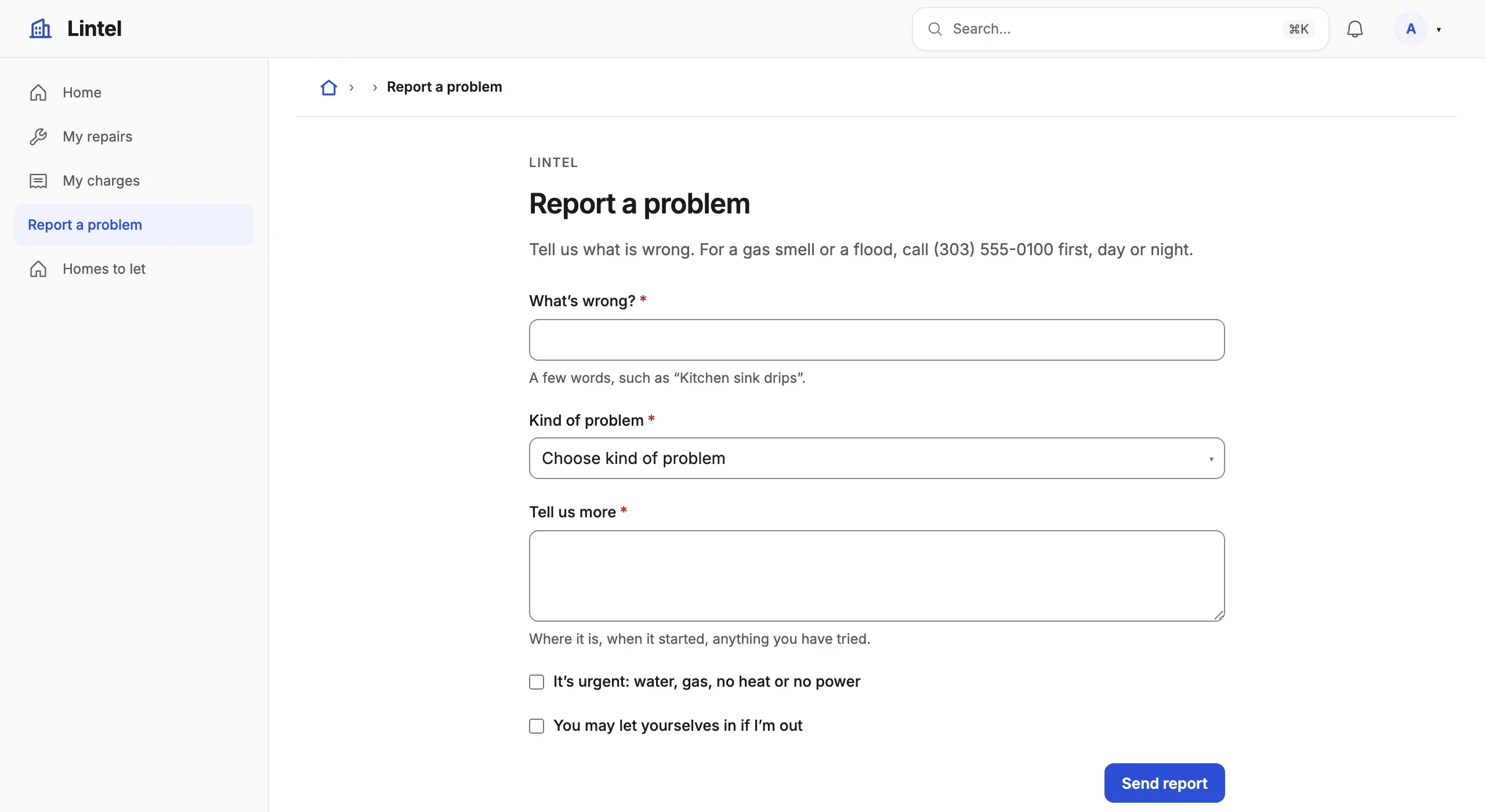
What you’ll see
Section titled “What you’ll see”- A room at
/reportthatnavandhomemay name, shown only to roles granted its command. - One
stepper page of a stepper (without steps, one page), each asking the command’s inputs it names, checked before sending. - The
donescreen after submitting, with Fill in another.
When to use it, and when not
Section titled “When to use it, and when not”- Use a command form when creating a record takes a command: several tables, a number, a check on other rows, or a public visitor.
- Use the resource’s own New form (
formon the resource) instead when a new row is its columns and the role writes the table (forms). - Use
targets: 'many'withbulk: trueon the action when the same command should apply to a queue’s whole selection at once.
Options
Section titled “Options”| Key | What it does | Default | Status |
|---|---|---|---|
steps (third argument) |
step(title, inputs): each input in exactly one step |
one page | Stable |
done |
The screen after submitting: { title, message } |
a generic one | Stable |
submitLabel, description, icon |
The button’s words, the words under the heading, the menu’s mark (signed in only) | none | Stable |
public |
Serve it signed out at /form/<key>, running a public: true command |
false |
Stable |
prefillable |
Inputs a page’s link may fill in | none | Stable |
resume, draft |
Save every step into your tables as the visitor goes | none | Stable |
All keys: the generated reference.
Signed-in forms
Section titled “Signed-in forms”A form is signed in unless it says public: true. Its command runs as the
person who submits it, under their roles. In a tenant App the row lands in
the member’s tenant, and under a row policy inside the member’s rows.
Public forms
Section titled “Public forms”public: true serves the form to anyone, running a command registered with
public: true (which implies targets: 'none'). Lintel lets a signed-out
visitor ask for a viewing this way:
export const requestViewing = defineCommand({ source: lintel, target: 'viewing', public: true, read: ['unit'],See it in the sample (examples/apps/lintel/commands/viewing.ts:9).
The server holds a public form to these rules:
- It always runs as a public principal (
actor.kind === 'public'), even for a signed-in visitor, and a public command cannot be granted to a role. - A
referenceinput picks from a resourceauth.publicopens, read as the visitor reads it: only the rows the public may read, by key and label (itsbyandlabelColumncolumns must be ones the public reads). Anything else is refused as[public-form-picker]. The handler still reads the chosen row itself. - Its handler reads the tables in its
read, whether or notauth.publicopens them. Under a row policy, it sees only the rows the policy’spublicFormsentry gives each one; a table that entry leaves out reads as empty, so a lookup there finds nothing rather than failing. - It is write-only. Its command answers
shape({ reference, message })and nothing else, and the done screen shows the reference and your fixed words. Make the reference random:publicReference('IGN')givesIGN-7K2M-QX4T-9BRD. - Its audit keeps which columns were written, not the values.
- Submissions are rate limited per client (five a minute, thirty an hour) and across all clients. Behind a proxy, name it with
--trust-proxy; with a cache every instance shares the budget. - It never appears in
nav; a landing page or a signed-outhomerule links to it. In a tenant App, the link’s?via=address places it with one tenant (tenant Apps).
Hold nothing scarce on an unverified submission: write a request that staff then act on.
Forms saved on every step
Section titled “Forms saved on every step”A public form whose steps each name a command of their own
(step('Address', 'saveAddress')) saves a long application into your tables
as the applicant goes; the form’s command is the final submit. A dealer application
in a tenant suite works this way; no shipped example shows one.
resume: { token, expires, progress, after: '14 days' }names the root row’s columns. The applicant’s place is an HttpOnly,SameSite=Strictcookie; only its SHA-256 is stored, and it is cleared on submit.- Later steps write tables that point at the root; the server fills the link in, and a step reads and writes only its own application’s rows.
- Nothing saved is answered back, even with the cookie. After a reload the review reads “Saved — not shown for your privacy”.
draft: { status: 'in_progress' }keeps drafts out of staff lists; a tab whose query names that value shows them. Expired drafts are purged when a new application starts, unlessabandoned: 'keep'.
A statusCheck lets an applicant ask for a submitted application’s state at
/form/<key>/status, confirmed by one to three details only they know. Every
wrong answer gets the same reply in the same time, and five failures lock the
receipt for an hour. stepUp: { email, show } emails a six-digit code that
opens more for 15 minutes, through the email service. link
adds a submitted application to an account on proven control only (the same
device, a passed status check, or an email verified by code), never on a
matching name.
Several records at once
Section titled “Several records at once”Declare targets: 'many' on the command and its action may say bulk: true:
one request names a queue’s selection (up to 200 records) and commits for all
of them or none.
export const approvePost = defineCommand({ source: forum, target: 'post', targets: 'many', write: ['thread', 'report'], when: 'status = held',The handler loops over records. Any refusal refuses the whole request and
names the record it is about. Before submitting, the form lists the records
that no longer match when, with Deselect ineligible. Public and
event-recording commands cannot target many. For a result per record, use a
fixed action with bulk: true, which writes each on its own.
Common mistakes
Section titled “Common mistakes”[public-form-reference]: a public form’s command answers noreference→output: shape({ reference: text({ pattern: publicReferencePattern('…') }), message: literal('…') }).- “A public command runs from a public form and names no record: drop its targets.” → delete
targets;public: trueimplies'none'. [restated]ontargets: 'none'besidepublic: true→ delete it.- The form is missing for a role → grant that role the form’s command; a signed-in form opens only to roles granted it.
Related
Section titled “Related”- Commands: the operation the form runs, its inputs and its receipt.
- Design a form: when a step earns its place.
- Public pages: the landing that links to a public form.
- Email: the codes and links a status check sends.