

Writing
tablewalk never writes to a database unless that connection’s config says "writable": true, and the server enforces it, not the page.
{ "connections": [{ "name": "local", "url": "postgres://localhost/app", "writable": true }] }Two gates
Section titled “Two gates”- The connection.
"writable": truein a config file is the only way to make a connection writable. A connection added from the page is read-only, and editing a connection’s URL makes it read-only again:writableis about one database and does not follow the entry to another. The server refuses a write to any other connection, whatever the page sends. - The browser. Even on a writable connection the page starts read-only. Open the
···menu and choose Editing enabled, then confirm Enable write mode. It stays on for that database, across reloads, until you turn it off, and it does not carry over to another connection. A red rule under the header shows it is on.
Editing a record
Section titled “Editing a record”In write mode a record’s fields become editors. Changes stay pending (“1 unsaved change”) until you Discard them or choose Review & apply. The review names the record, the old and new values, and the exact SQL with its parameters:
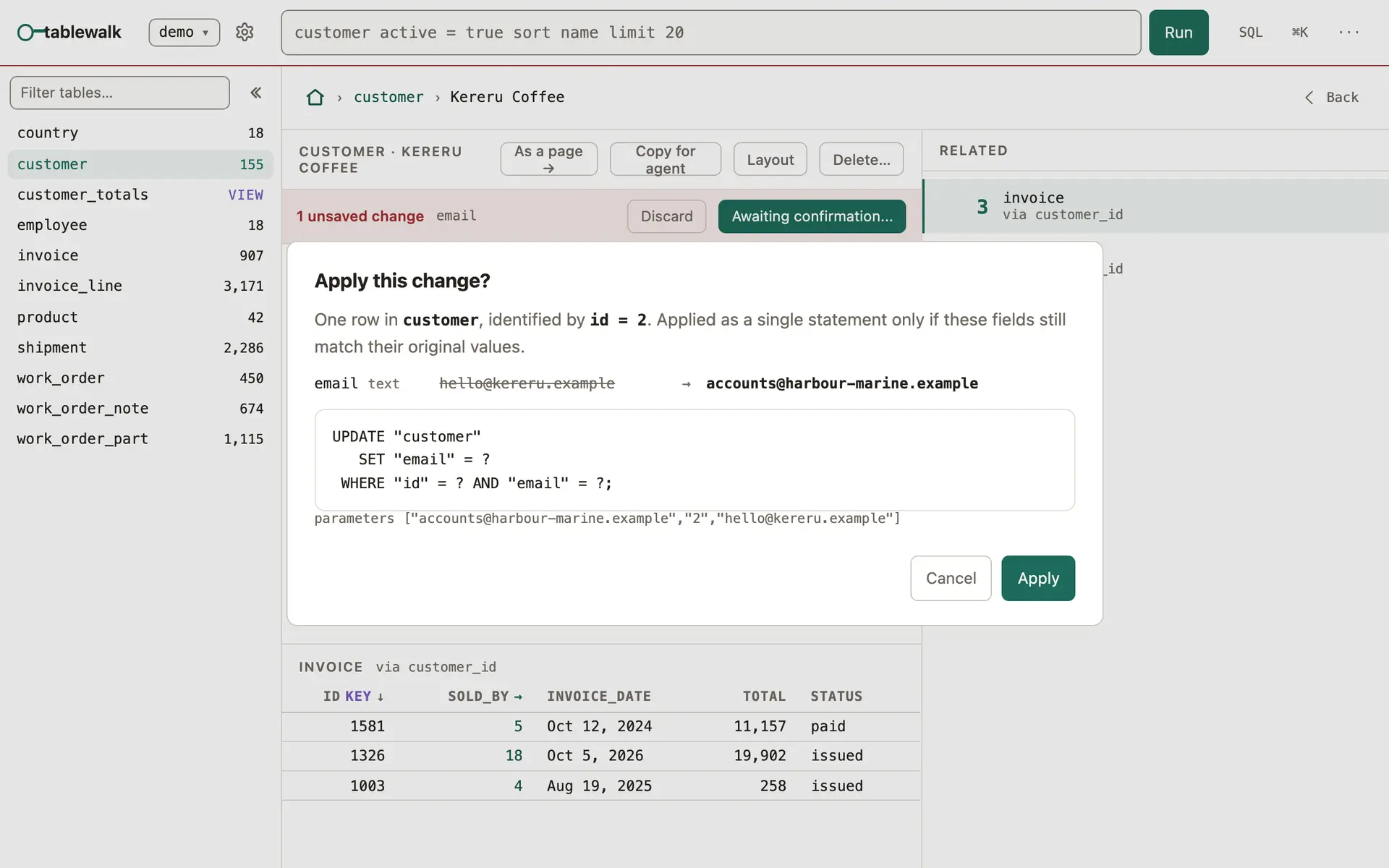
The WHERE names the whole primary key and the value you started from, so a row someone else changed in the meantime is not overwritten. An update that would touch anything other than exactly one row is refused. A write waits up to five seconds (--lock-timeout) for a row another transaction holds, and is then refused so you can retry.
Adding and deleting
Section titled “Adding and deleting”- + New row on a table opens a form built from the table’s columns.
- Delete… on a record first shows what the database will do to the rows that point at it: deleted too, kept with the reference emptied, or blocking the delete. Nothing is deleted until you confirm.
⌘Z, outside a text field, undoes the last write, and so does Undo the last edit in the ··· menu. The server keeps one journal per connection for the life of the process, so an edit, a new row, a delete, or a write an agent made over MCP can be undone. It re-reads every row first and refuses the whole undo if one has changed since, rather than putting an old value over a newer one.
SQL that writes
Section titled “SQL that writes”On a writable connection the SQL editor offers Run as write…, which runs the statement on the write connection after one more confirmation. It cannot be undone from tablewalk.
How reads stay read-only
Section titled “How reads stay read-only”- A read runs one statement in a read-only transaction. SQLite is opened read-only, and PostgreSQL sessions start with
default_transaction_read_only = onand a 30-second statement limit. - A write opens a second connection, so the one every read uses stays read-only for the life of the process.
- Table and column names are checked against the catalog before they are quoted into a statement, and every value is a bound parameter.
- Read-only is enforced on the session, not the database role. A PostgreSQL superuser can still do things a read-only transaction allows, so connect as a role that can only read when it matters. tablewalk prints a warning at startup when a read-only connection uses a role that could do more.
Agents
Section titled “Agents”A coding agent connected over MCP gets the write tools only when a connection is writable, and they write only to that connection. Deleting through MCP shows the impact first and asks for confirmation.